Why Bad Ecommerce Product Categorization is Killing Your Email Conversion Ratess!
There’s a silent killer of ecommerce conversion rates.
And 98% of marketers don’t talk about it because it’s “not their job.”
Here it is: neglecting your product categories.
I work with ecom brands that have 50 SKU’s and 50,000 SKU’s… and they both have mismanaged and disorganized product category hierarchies.
Shopify knows it’s a HUGE problem.
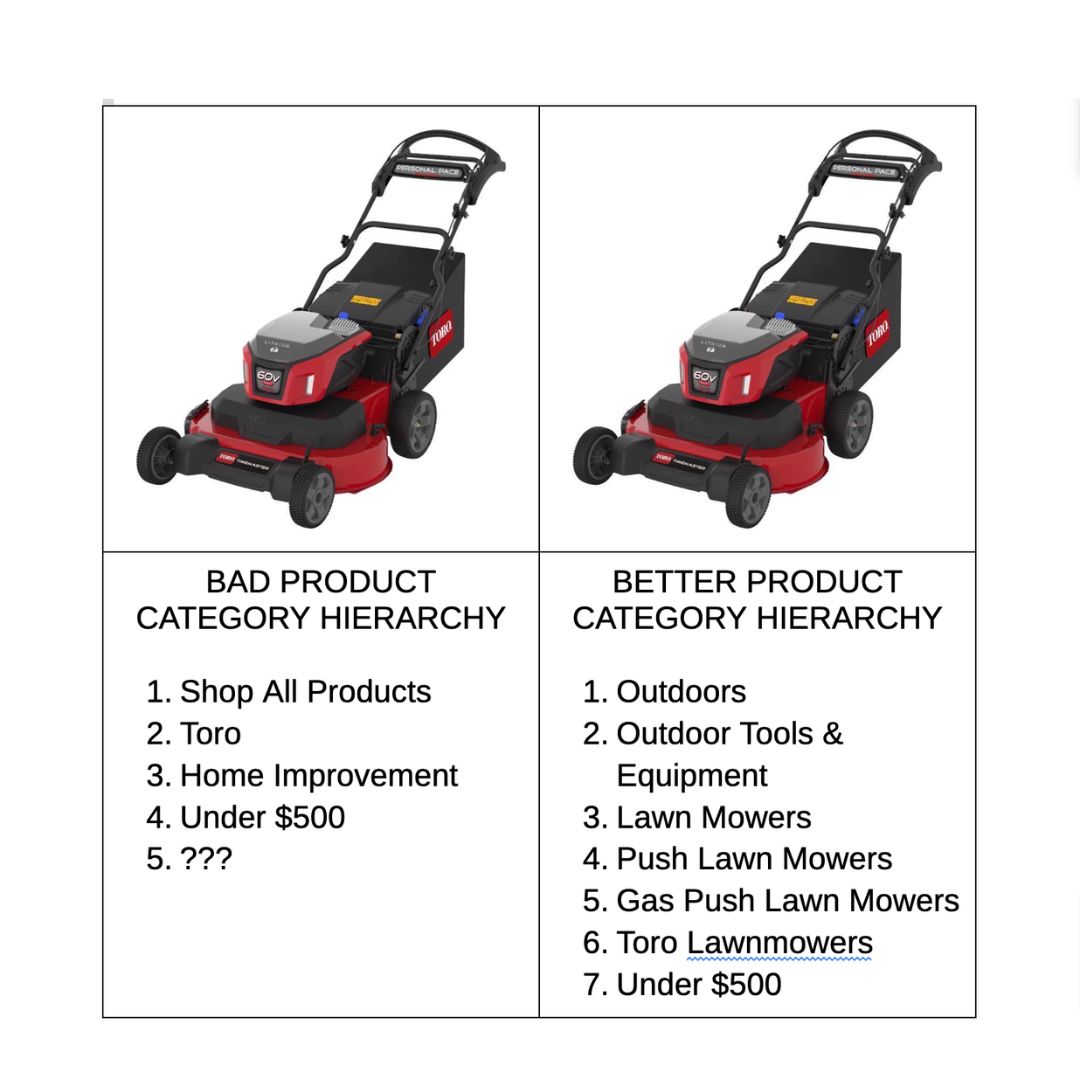
Let me share this visual of a lawnmower I was searching for on an 8-figure brand’s website:
Why Bad Ecommerce Product Categorization is Killing Your Email Conversion Rates | HiFlyer Digital
Because this brand has disorganized product categories, Klaviyo, Google and Facebook don’t know I’m shopping for lawnmowers.
They think I’m searching for “shop all products” or “home improvement”.
Which I’m clearly not.
See, most brands try to rush out products on their sites and neglect their product categories entirely.
That leads to terrible conversion rate and low product discoverability in your website search.
Or worse, brands simply add products to EVERY FREAKING CATEGORY… and never remove them.
So that Father’s Day category that passed months ago is still sitting there.
But, as I said, it’s even worse:
Disorganized product categorization and hierarchies leads to broken retargeting on email, SMS, Google, Facebook and more.
Did I get your attention now?
Go back to that lawnmower.
Klaviyo, Google and Facebook have ZERO indication that I was shopping for lawnmowers… so the retargeting efforts don’t run or simply suck.
Now, imagine if Klaviyo, Google and Facebook knew that I was looking at:
1) Lawnmowers
2) Push Lawn Mowers
3) Gas Push Lawn Mowers
4) Toro Gas Push Lawn Mowers
Holy $!@#!
Look how organized and structured this lawnmower is on Lowe’s:
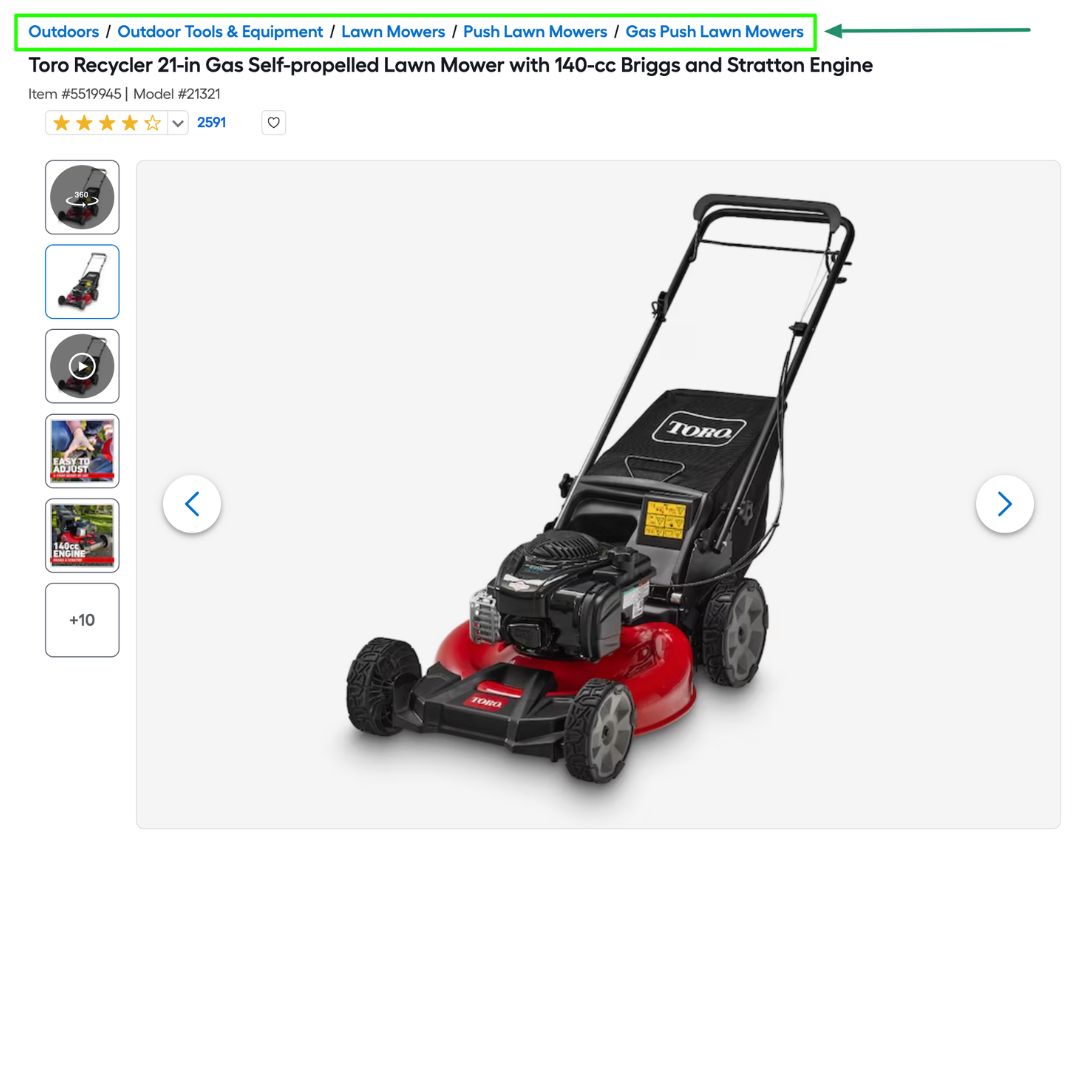
Jealous? You should be… but you can do it also.
Imagine how much more effective your retargeting could be if you could show visitors the best gas push lawn mowers in Klaviyo and on Google and Facebook ads.
Disorganized product categories and hierarchies are killing your conversion rate.
Organized categories will convert shoppers fasters.
And double your revenues because your email & SMS retargeting will be greatly enhanced.
Step #1: Export your SKU’s
Start small and work your way up.
So build three segments: people who click, people who open, everyone else.
Clickers, Openers and Remainders.
Super simple.
Well, be sure to add to the Openers segment “people who opened the email but did not click”.
That will be useful shortly.
Step #2: Map out your category hierarchies.
Take some time to think out your product taxonomy, categories and breadcrumbs.
This Shopify resource will help.
I won’t dive into the nitty gritty here but start broad and work your way down.
Like the screenshot above, a lawnmower can be categories as such:
- Outdoors
- Outdoor Tools & Equipment
- Lawn Mowers
- Push Lawn Mowers
- Gas Push Lawn Mowers
- Toro Lawnmowers
- Under $500
Start broad and get more granular but not too granular that the data is unactionable.
Map out each category in an Excel file.
Step #3: Go to Fiverr.
Hire a Virtual Assistant to categorize thousands of your SKU’s
I’ve done this a dozen times and they’re experts at it.
They’ve got pivot tables and scripts and algorithms that you and I don’t have.
Fiverr people have a ton of resources to get this done faster and better than you.
Step #4: Re-import & Refresh
Re-import your products and refresh your product feed.
Now Klaviyo, Google and Facebook have fresh product data and categories.
You may need to scrub the website again to confirm nothing is broken and the pages / collections load like you imagine.
Which is why I recommend to start small and build up from there.
And to be honest, you should’ve done this BEFORE you launched your website.
Now, check your work and let’s start marketing!
Disorganized product categories and hierarchies are killing your conversion rate.
Organized categories will convert shoppers fasters.
And double your revenues because your email & SMS retargeting will be greatly enhanced.
Click here if you want to implement more 10-figure email & SMS strategies of the top brands in minutes, not month.
Loved the blog post? Take one of these next steps: